Your AI plans it. Parameter runs it.
Parameter is a workout app for iPhone and Apple Watch that any AI can plan over MCP. This page has everything needed to write about it: descriptions to quote, facts, screenshots, and the app icon. No sign-up, no watermarks.
The zip is in production. Until it lands, email [email protected] and the assets come back the same day.
Descriptions to quote
Parameter is an iPhone and Apple Watch workout app that any AI can plan over MCP: Claude, ChatGPT, Gemini, Grok, or Perplexity writes your training and adapts it from your logged results, and Parameter runs it for $1 a month.
Parameter is a workout app for iPhone and Apple Watch built around a simple idea: you already subscribe to an AI that is a smarter coach than any fitness app's built-in one. Connect it once, and your AI plans your training from your goals, your equipment, and your real workout history, then pushes the plan straight into the app. Parameter runs what your AI writes and logs what actually happened: strength, intervals, cardio sessions, classes, and rest, on iPhone and Apple Watch. The app is free. The AI connection costs $1 a month after a two-week free trial. There is no Parameter account, and your data lives in your own private iCloud database, where the developer cannot read it.
Fact sheet
- Name
- Parameter
- Category
- Health and fitness
- Platforms
- iPhone and Apple Watch
- Requires
- iPhone with iOS 17 or later. Apple Watch with watchOS 10 or later recommended, not required.
- Price
- Free. The AI connection is $1 a month with a two-week free trial. Planning, execution, history, and full data export are free regardless.
- Works with
- Claude, ChatGPT, Gemini, Grok, Perplexity, and any MCP-compatible client
- Account
- None. No sign-in, no email collected. Data lives in the user's own private iCloud database.
- App Store
- To be announced
- Developer
- Jacob Pewitt Yancey, solo developer. Coos Bay, Oregon, United States. No funding, no growth team.
- Website
- parameterfit.com
- Press contact
- [email protected]
What Parameter does
Parameter starts from an observation: the AI you already pay for, the one you talk to every day, is a smarter coach than any fitness app's built-in one. It can periodize a training block, adapt around a tweaked knee, and tell you whether your squat is actually progressing. What it lacked was a place to put the plan.
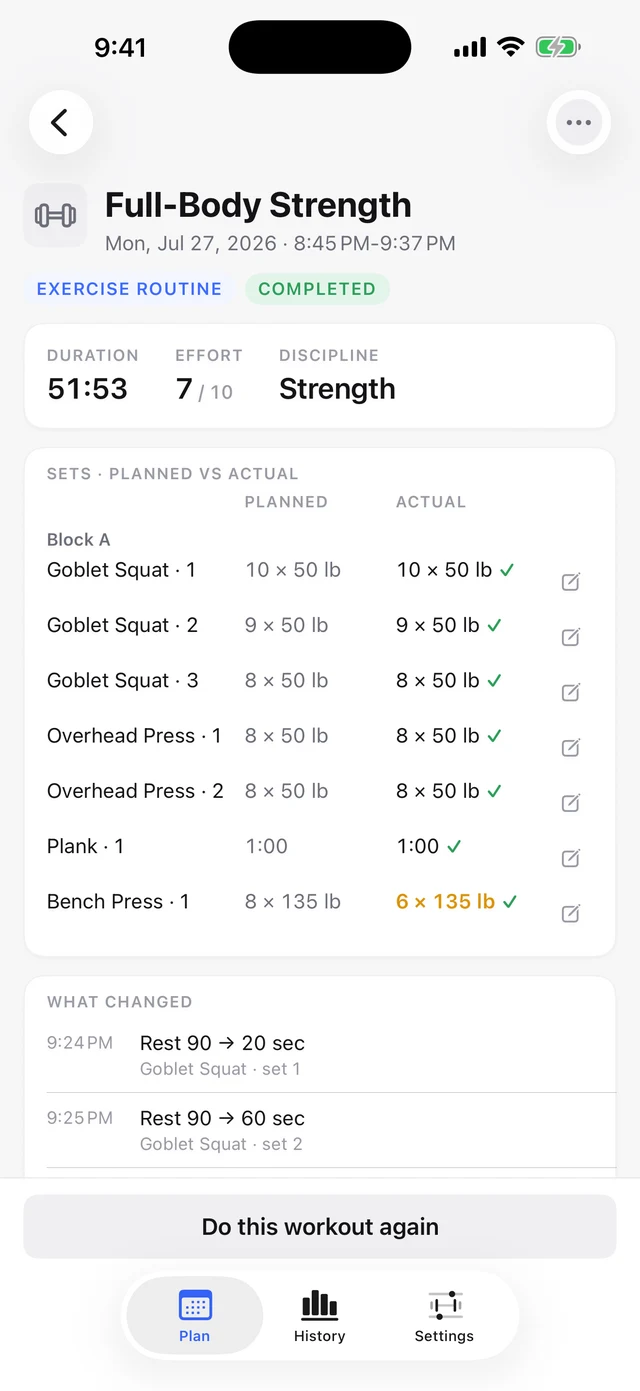
Connect Parameter to your AI once, and planning happens in the chat you already use. Ask for a week of training and your AI reads your profile, your equipment, and your real workout history, then pushes the plan straight into the app. Ask it to adjust today's session and the change appears on your phone and your watch. Parameter never writes a plan of its own; its job is to run what your AI writes and to log the result honestly, so the next plan is built on what you actually did rather than what was scheduled.
Parameter runs four kinds of training, plus rest. Guided classes you follow in another app, like Peloton or Apple Fitness+, get logged and linked. Structured intervals run with a live segment display, auto-advancing cues, and heart-rate-zone targets. Exercise routines show your last set before you lift and include a plate calculator built from the plates you actually own. Simple sessions cover a run, a ride, or a walk. Rest days are first-class entries with their own card and recovery guidance, not empty gaps in the week.
The Apple Watch app works fully standalone, with its own sync, so a run or a lift is tracked wrist-only if that is all you bring. Whichever device starts a workout, the other shows the same execution screen, and pause, skip, end, and adjust work from either one.
In the gym, Parameter can drive compatible Bluetooth machines directly. On FTMS treadmills, bikes, and rowers, it pushes each segment's speed, incline, resistance, or power target to the machine, verifies the machine actually reached it, and follows your console overrides instead of fighting them. If you opt in, it can even nudge the machine automatically to keep your heart rate in a segment's target zone. Starting and stopping the machine is always yours: nothing Parameter does ever starts a belt or stops a ride. For machines without Bluetooth control, your live heart rate can broadcast to many consoles' chest-strap pairing menus, and any interval workout prints as a numbered step-by-step table you type into the console.
Everything you record stays yours. There is no Parameter account, your data lives in your own private iCloud database, and a full export, complete JSON plus a CSV summary, is free whether you subscribe or not. There are no streaks, no guilt mechanics, and no marketing notifications; a skipped workout renders in neutral gray, never red.
Parameter is built and maintained by one person, Jacob Pewitt Yancey, in Coos Bay, Oregon, with no funding and no growth team.
What MCP is
MCP, the Model Context Protocol, is an open standard introduced by Anthropic in late 2024 and since adopted by every major AI assistant. It gives an AI a safe, structured way to use outside apps: what it may read, what it may write, and nothing else. When you connect Parameter, your AI can read your training profile, equipment, and history, and can write plans and workouts into the app. You never see MCP itself. You talk to your AI the way you already do, and the plan shows up in Parameter.
Where the data lives
Parameter has no account system and no sign-in of its own. Your workouts, profile, and history live in your own private iCloud database; Parameter runs no database of its own to store them in, and the developer cannot read them.
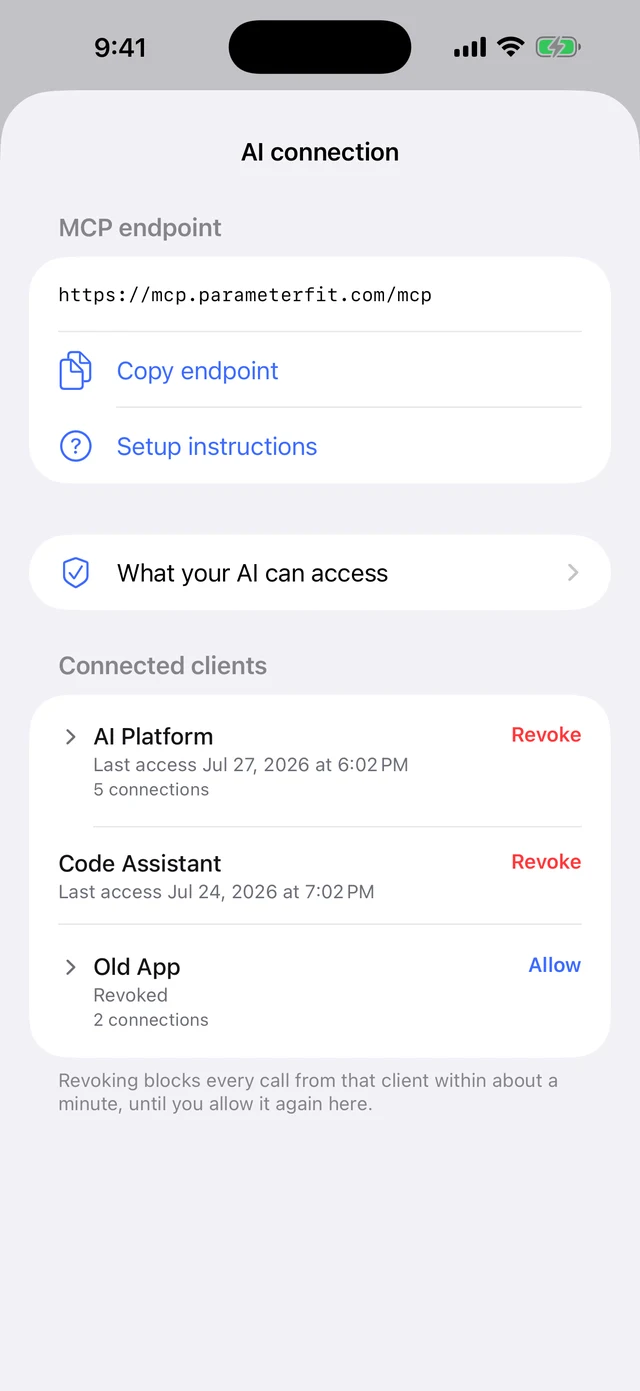
The AI connection works through Parameter's AI Connector, the server your AI talks to. It passes each request through to your iCloud and keeps no workout data ever. The only things it stores are one encrypted authorization token per account and limited diagnostic logs, and the token is deleted within hours of revoking every connected client or deleting your data.
Authorizing an AI happens on Apple's own iCloud sign-in page; Parameter never sees or stores your Apple ID password. Before the connection is ever shown, the app requires you to review exactly what an AI will be able to access, and every connected client is listed in Settings with its last access time and a Revoke button that cuts off access within about a minute. An AI can write plans and workouts, but it can never write your logs, your profile, or your equipment, so your recorded history cannot be corrupted by a plan push.
One caveat belongs in any accurate story: when your AI plans your training, the data you chose to share becomes part of your conversation with that AI provider, under that provider's terms. Parameter keeps the scope explicit and revocable; it does not change what your AI's provider does with a conversation.
The app contains no analytics, advertising, or crash-reporting SDKs, and its App Store privacy label is Data Not Collected.
Pricing and requirements
The app is free: building workouts by hand, running them, history, and full data export never cost anything. The AI connection is the only paid feature, at $1 a month with a two-week free trial. If the subscription lapses, nothing is deleted and nothing else is gated.
Parameter requires an iPhone running iOS 17 or later. An Apple Watch is recommended for live heart rate and execution from the wrist, but not required. A plan written by your AI needs an MCP-compatible client, such as Claude, ChatGPT, Gemini, Grok, or Perplexity. Building and logging workouts by hand needs no AI client at all. Parameter does not include an AI of its own, and the subscription does not include access to one.
"I built Parameter because the AI I already talk to every day is a smarter coach than any fitness app rents me; it just had nowhere to put the plan."
"Parameter is the app I wanted to exist. One app for every kind of training I do, planned by the AI I already pay for, with my data in my own iCloud where I, the developer, cannot read it. I am one person with no funding and no growth team, and the economics are set up to stay that way: the app is free, the AI connection is a dollar a month, and there is nothing else to sell. No account, no ads, no streaks, and no notifications trying to win me back."
Story angles and demo prompts
Angles, depending on your beat
For Apple readers: a one-person app with a fully standalone Apple Watch app. Whichever device starts a workout, the other shows the same execution screen. Live Activities, watch complications, Siri phrases, and an Action Button binding are all there, with no third-party SDKs and no growth mechanics. The premise is the opposite of every AI feature announcement this year: instead of building a chatbot into a fitness app, Parameter assumes the AI you already subscribe to is the better coach and gives it somewhere to work. It is also one app doing the work most people stack two for: strength, intervals, cardio sessions, classes, and rest live in one history and one watch app. The build is SwiftUI throughout, with no third-party code beyond a few icon glyphs from Lucide and Phosphor, and no third-party SDKs of any kind.
For AI readers: most MCP servers are developer tools. This one's output is physical: a training plan your AI writes in chat becomes structured workouts with heart-rate-zone targets, executed on a watch, and the logged results, including what deviated from the plan, are readable by the AI before it plans the next week. On compatible gym equipment the plan even drives the machine: segment targets are pushed to FTMS treadmills, bikes, and rowers, and the machine's own readings flow back into the log. The server keeps no workout data ever; the user's own iCloud is the store, and the AI's write access stops at plans and workouts, never logs.
For privacy readers: a fitness app whose developer cannot read a single workout. No account, no analytics SDKs, an App Store privacy label of Data Not Collected, and a free full-data export. The subscription is $1 a month and gates only the AI connection.
Try it in one prompt
If you have TestFlight access and a connected AI client, each of these works on a brand-new, empty app; nothing needs to exist first:
Plan my week. I'm training for a 10K in six weeks and I lift Tuesdays and Thursdays.
Look at what equipment I have and build me a 30 minute interval workout for tomorrow.
Ask me what you need to know, then plan my first two weeks of getting back into training.
Once you have logged a workout or two, ask "How is my week actually going?" and your AI reads the log, including anything that deviated from the plan.
What Parameter is not
Not an AI. Parameter contains no AI and the subscription does not include one. It connects to the AI you already use.
Not a coach. The app never writes a plan of its own. If no AI is connected, you build workouts by hand, and everything except the AI connection is free.
Not a data business. No account, no analytics, no ads, no email list inside the app. The developer cannot read your workouts.
Not in charge of starting your treadmill. On compatible Bluetooth machines, and only if you opt in, Parameter adjusts speed, incline, resistance, and power during a workout, and heart rate broadcasts to many machine consoles. Starting and stopping the machine is always yours. For everything else, interval workouts print as a step table you enter yourself.
Not on Android or the web. iPhone and Apple Watch only.
Questions journalists ask
Does the user need a paid AI subscription?
What exactly can the AI see and do?
Is health data involved?
Will it start my treadmill?
When does it launch, and can I try it now?
Is there a review guide?
Assets
Everything below is free to use in coverage of Parameter, unmodified or cropped, no attribution needed. Screenshots are actual app frames at native resolution, uncaptioned. The class shown in the class frame is fictional.
Parameter is a workout app for iPhone and Apple Watch. The AI you already use plans your training over MCP; Parameter runs it and logs it. The app is free, with the AI connection at $1 a month. No account; data lives in the user's own iCloud. Built by solo developer Jacob Pewitt Yancey in Coos Bay, Oregon. parameterfit.com